
For general contractors and property managers
One lapsed policy shouldn't cost you everything.
A worker gets hurt on your site. Turns out the subcontractor's insurance quietly expired weeks ago, and now the claim is your problem. TradeGuard makes sure every sub is actually covered, and warns you the moment they're not, so you're protected before the accident, not scrambling after it.
No credit card required · Cancel anytime · 14-day free trial
See it in action
Every sub's coverage, at a glance, in one place
From a live risk dashboard to catching a forged certificate, here's the whole thing in under 30 seconds.
It was never really about the paperwork
A certificate is just proof. What you actually care about is that when something goes wrong on your site, the coverage is real and still active. Here's where that quietly falls apart, and how TradeGuard keeps you protected.
The Math Isn't Hard
Spreadsheets don't send alerts. One missed expiration can dwarf a year of software costs.
Spreadsheets & manual tracking
Hours every week
Chasing subcontractors, re-keying data, triple-checking expirations.
One missing certificate
$727,000
Settlement and defense costs in Interstate Fire v. Cleveland Wrecking (Cal. Ct. App. 2010), after a sub skipped the insurance its contract required.
TradeGuard
from $149/mo
Automated alerts, portal, smart PDF extraction & gap analysis.
Start free trial →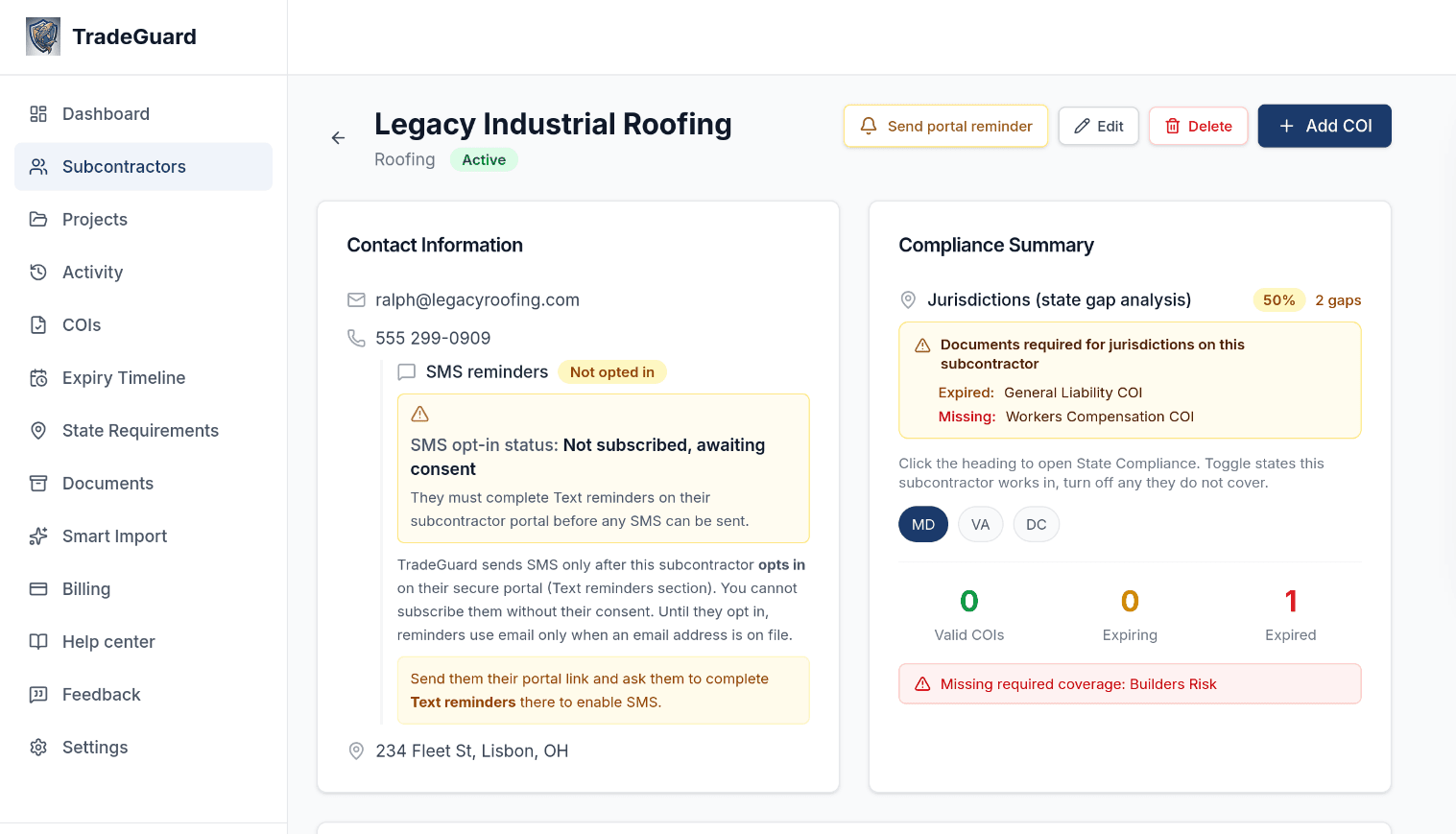
Gap Analysis
See Every Missing Document Before It Becomes a Problem
TradeGuard automatically cross-references every subcontractor's documents against the requirements for your operating states. An electrician in California without a CSLB license? Flagged instantly. No manual checklists. No surprises on the job site.
- Per-subcontractor missing document flags
- State-specific requirement matching for all 50 states + DC
- Compliance score visible across your whole roster
- Identifies gaps before audits, bids, or project kick-offs
Expiry Alerts
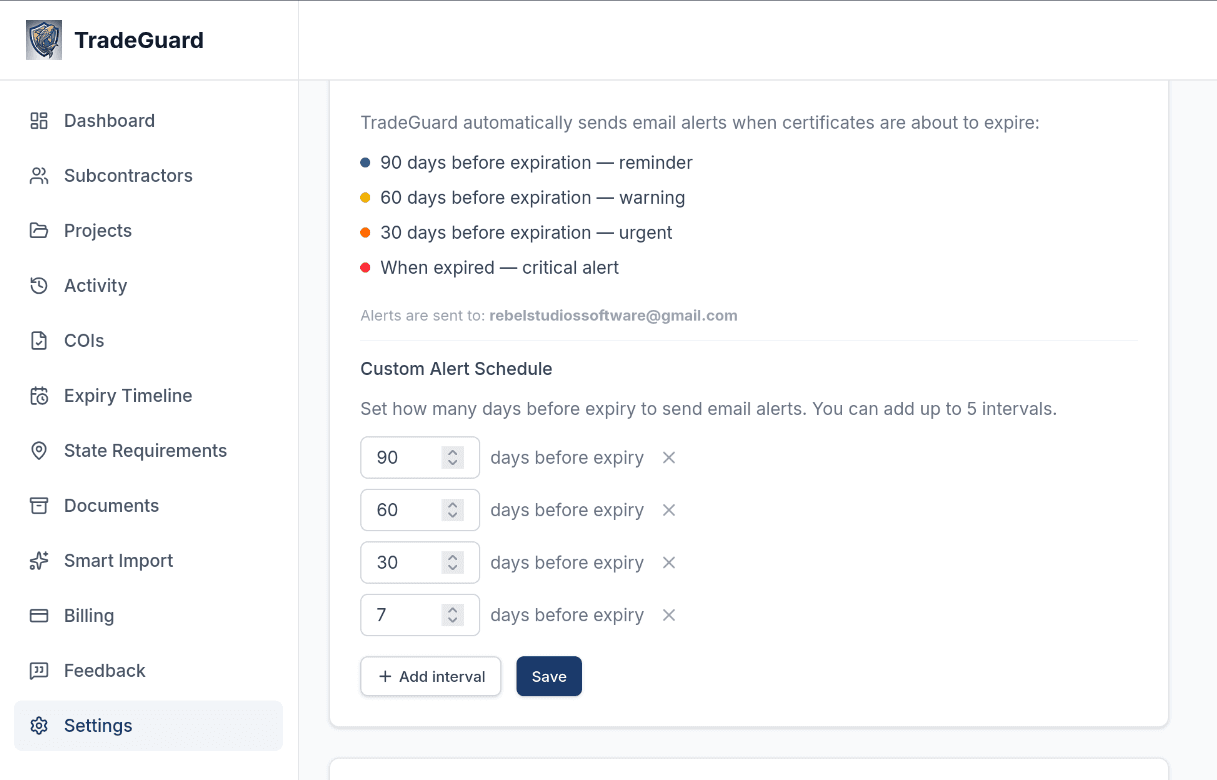
An Alert at Every Interval You Set, Not Just Once
Configure up to 5 alert thresholds per document: for example, 90 days, 60 days, 30 days, 7 days, and day-of expiry. TradeGuard fires a separate notification to your team at each threshold as the date approaches. You can also choose a threshold to automatically send the subcontractor a renewal request with a one-click upload link, so they get reminded without you picking up the phone.
- Each interval you set fires its own alert: 90 days out, 60 days out, 30 days out, and so on
- Email notifications to your team; SMS available
- Pick any threshold to auto-send the sub a direct renewal request with an upload link
- Final alert fires the moment a document expires, so nothing slips through unnoticed
Compliance Standards
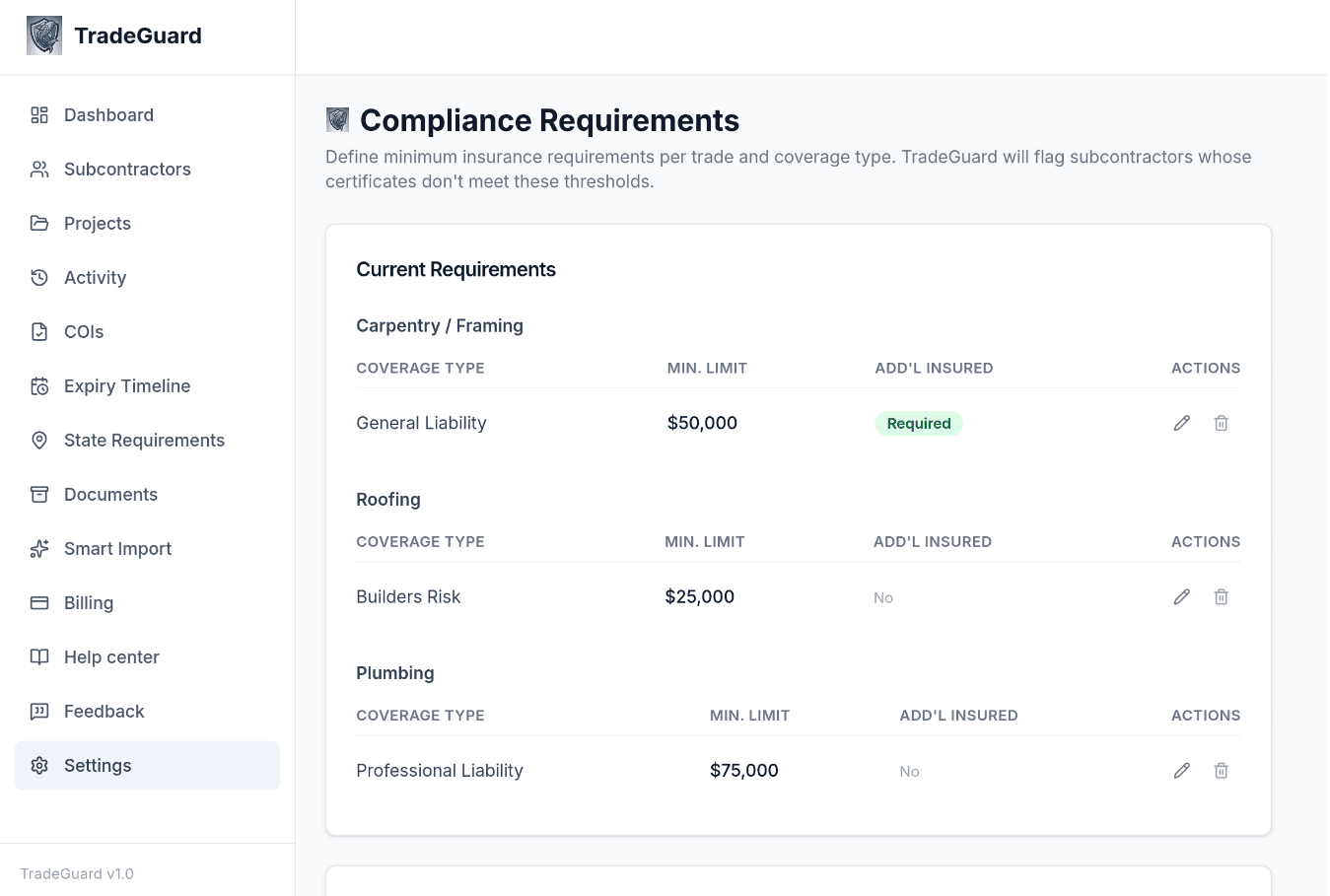
Enforce Your Own Minimum Insurance Standards
Set minimum coverage limits per trade and coverage type. A roofing sub with a $25,000 Builders Risk policy when you require $100,000? TradeGuard flags it automatically. Your compliance standards enforced, consistently, across every subcontractor.
- Set minimums per trade and coverage type
- Require additional insured status on any policy
- Automatic flag when a sub's COI falls short
- Consistent enforcement across your whole roster
Expiry Timeline
See Every Upcoming Expiration, Ranked by Urgency
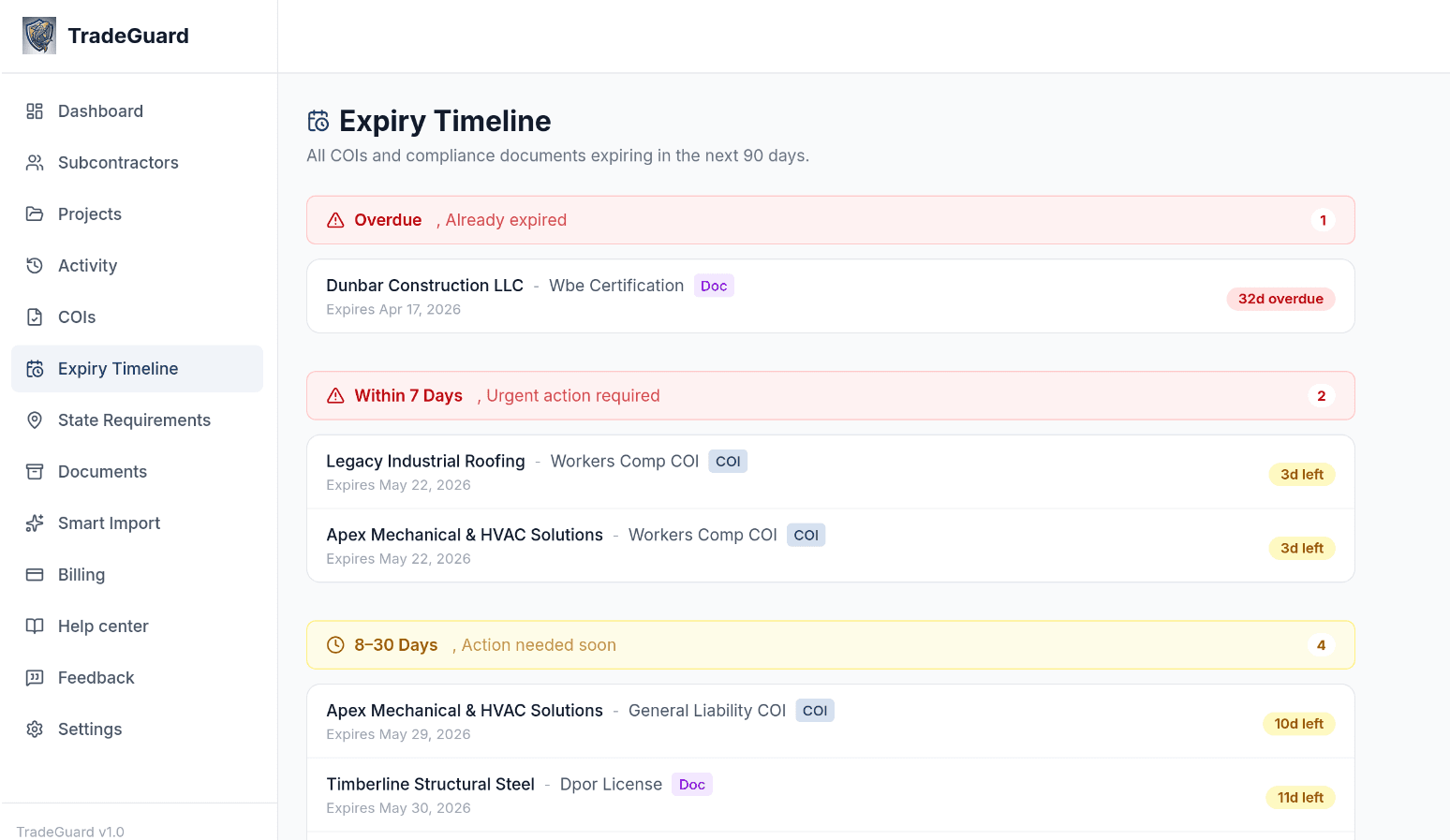
The Expiry Timeline gives you a single view of every COI and compliance document grouped by how critical it is: overdue, expiring within 7 days, expiring in 8–30 days, and beyond. No more scanning a spreadsheet or hunting through email chains. You open one page and know exactly where to focus your attention today.
- Overdue items pinned at the top with days-elapsed count
- 7-day critical zone highlighted in red for urgent action
- 8–30 day warning zone so you can request renewals ahead of time
- Covers both COIs and compliance documents in the same view
- One click from each row takes you directly to that subcontractor
Project Compliance Lock
Lock a Project When It Matters, on Your Terms
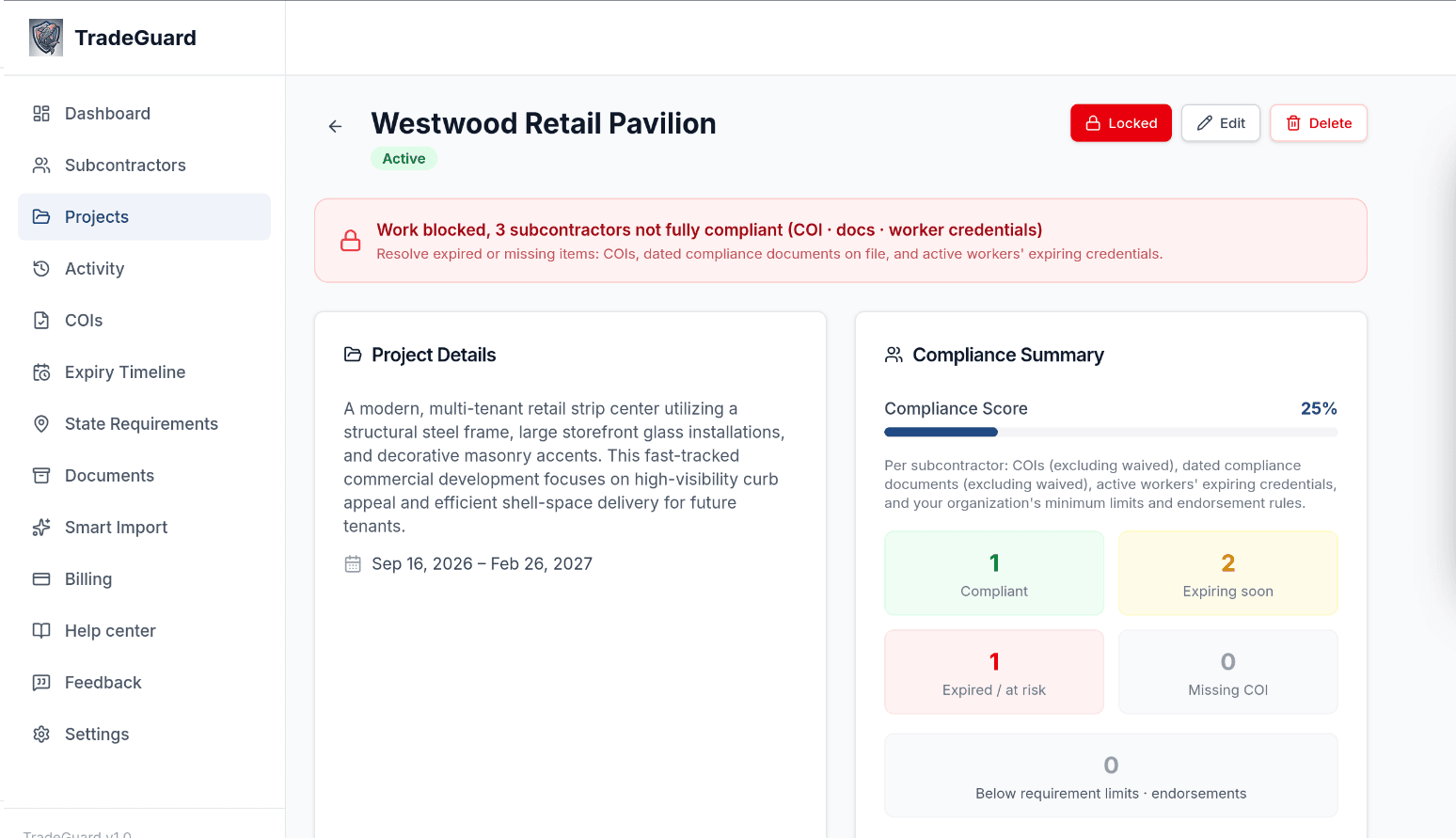
When you're ready to enforce compliance on a project (before breaking ground, before a subcontractor mobilizes, before an owner audit), you lock it with one click. From that point, TradeGuard shows you exactly which subs are clear and which are blocking the project. You decide when the gate goes up. The system tells you who's not through it yet.
- You choose when to lock; nothing locks automatically
- Red / green compliance status per subcontractor, visible at a glance
- Drill down to see exactly which document is causing the block
- Send a portal renewal request to the blocking sub in one click
- Shows clients and insurers a clear compliance gate was in place
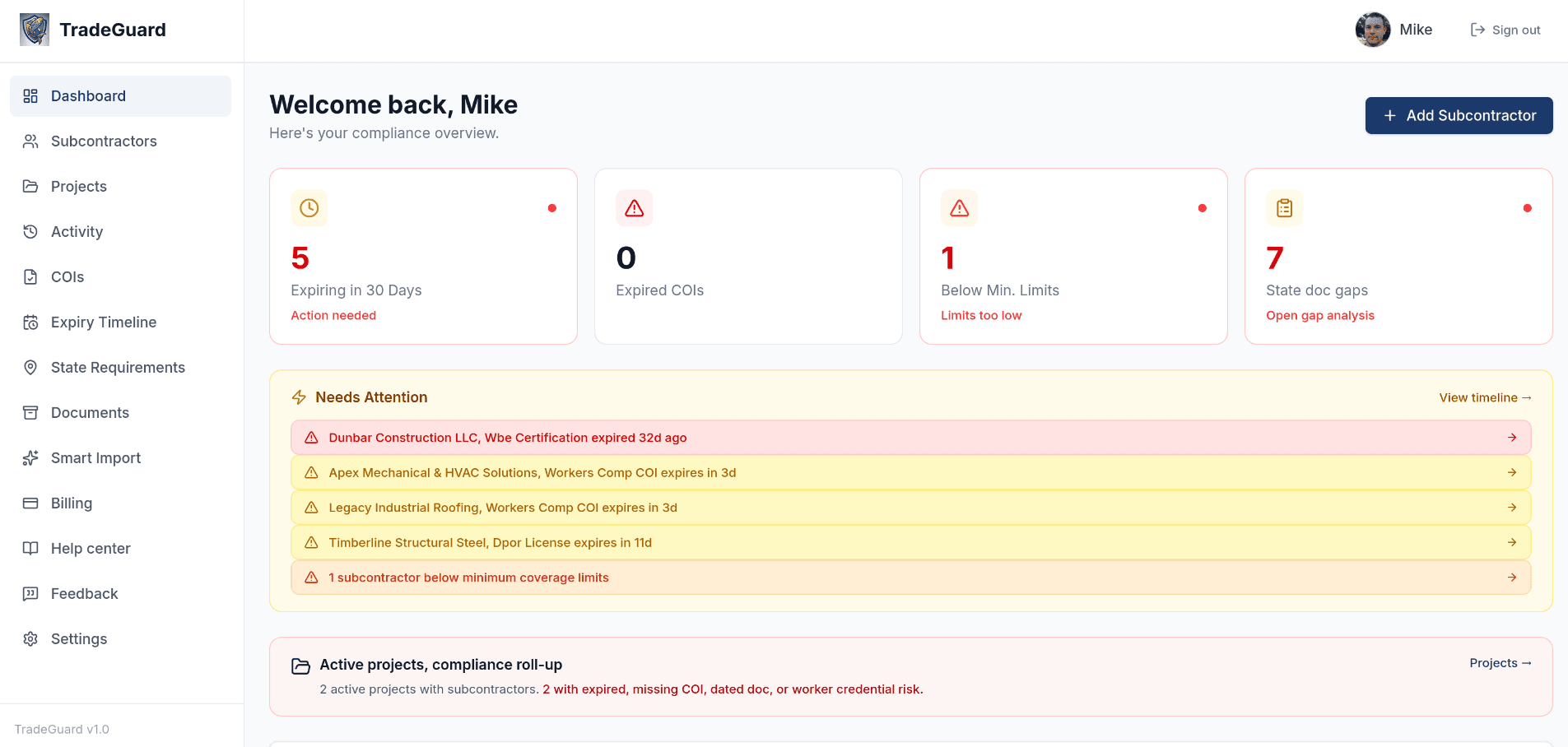
Compliance Dashboard
Your Entire Compliance Picture the Moment You Log In
The dashboard is your command center. Before your first meeting of the day you can see exactly how many COIs are expiring in 30 days, how many have already lapsed, which subs are below your minimum coverage limits, and any open state document gaps. Everything is ranked by urgency, so there's no digging through spreadsheets.
- At-a-glance stats: expiring, expired, below limits, and state gaps
- Needs Attention panel ranks the most urgent items first
- Active project compliance rollup shows blocked projects instantly
- COI attention table covers every expiration in the next 90 days
Smart Extraction
Upload a COI. TradeGuard Fills Everything In.
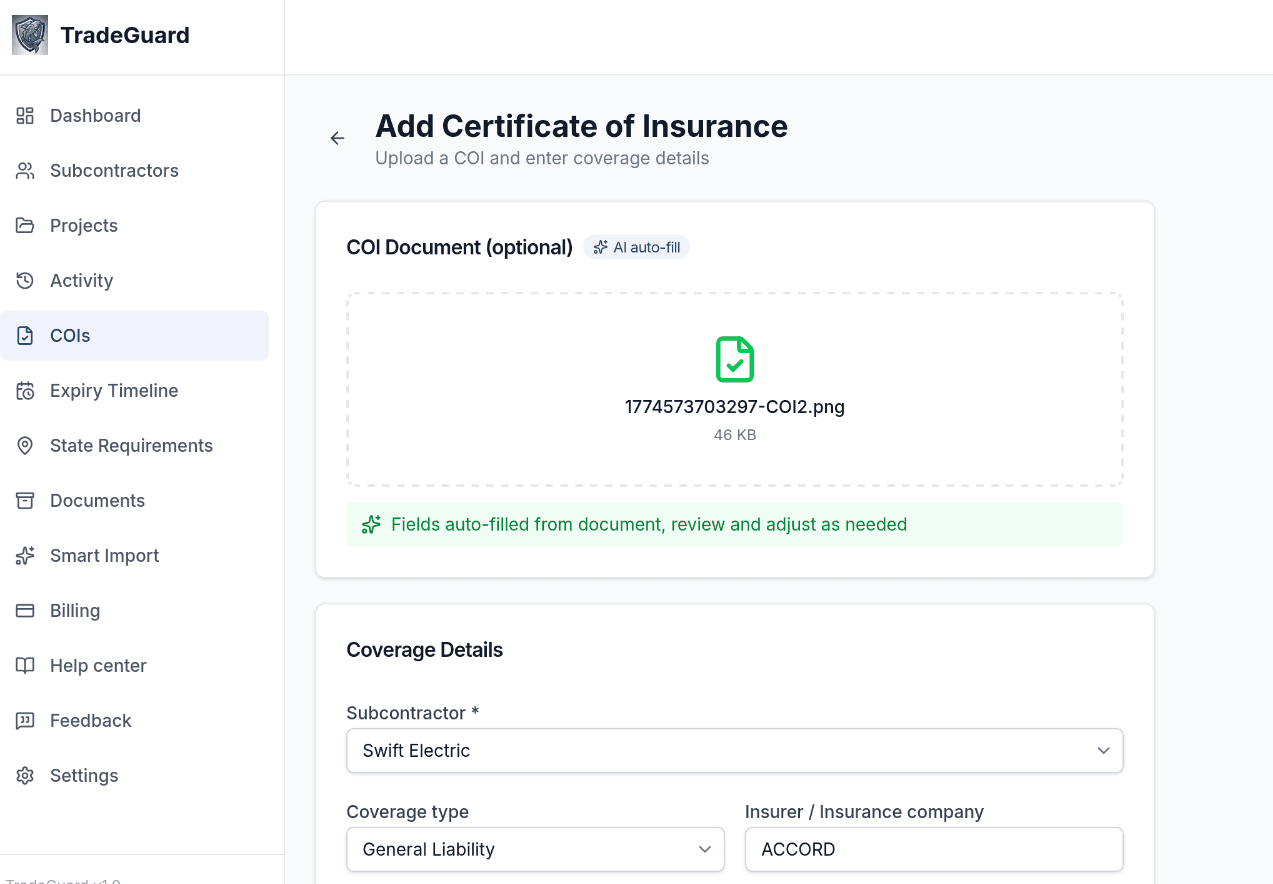
Drop in the PDF and TradeGuard reads the insurer name, policy number, every coverage type, every limit and the expiration date, usually in under 30 seconds. No manual entry, no transcription errors, no squinting at fine print. The moment the expiration date is extracted, your alert schedule is set and you're done.
- Extracts insurer, policy number, all coverage types, and limits automatically
- Expiration date detected and alerts scheduled with no extra steps
- Works on standard ACORD forms and most insurer-issued PDFs
- Flags missing endorsements or coverage below your minimums on the spot
Fraud Detection
Fake COIs Are More Common Than You Think
Subcontractors have been caught submitting altered certificates: changed expiration dates, inflated limits, fake insurer names. TradeGuard checks every COI automatically so you don't have to.
AI Tamper Analysis
Every uploaded COI is analyzed for signs of editing: font inconsistencies, resolution mismatches, white-box overlays, and misaligned fields. A tamper score from 0–100 is assigned automatically.
PDF Metadata Forensics
TradeGuard inspects the PDF's hidden metadata, checking whether it was created in Photoshop, GIMP, SmallPDF, or another editing tool, and whether the document was modified after its creation date.
Direct Broker Verification
Flag a suspicious COI and TradeGuard emails the broker directly. They confirm or dispute the policy with one click. You get notified the moment they respond, verified or not.
Don't take the PDF at face value. A spreadsheet or a shared drive accepts whatever file is uploaded. TradeGuard checks each COI for signs of tampering and loops in the broker to confirm it's genuine.
QuickBooks Integration
Stop Before You Pay an Uninsured Sub
Connect QuickBooks Online and TradeGuard pulls in your vendors as subcontractors automatically. Before you approve a payment, TradeGuard shows you which bills belong to vendors with expired or missing coverage, so the decision is always informed, never accidental.
- One-click import of all active QBO vendors as subcontractors
- Payment review flags unpaid bills from non-compliant vendors
- Hold or approve each bill with a full audit trail
- Deep link opens the bill directly in QuickBooks
Payment Review Example
General Liability expired 12 days ago
No certificates on file
All coverage valid
Up and Running in Minutes
No lengthy onboarding. No implementation fees. Three steps from roster to monitored compliance.
Step 1
Add Your Subcontractors
Import your existing roster via CSV or add subcontractors one at a time. Set their trade, operating states, and which documents are required. Takes minutes.
Step 2
Collect Documents
Upload COIs yourself and TradeGuard fills in the details automatically, or send each subcontractor a secure portal link and let them upload directly, with no account needed. Bulk-send to your whole roster in one click.
Step 3
Get Alerts & Gap Analysis
TradeGuard monitors every expiration date and runs gap analysis against state requirements. You get alerts when something is expiring or missing, before it becomes a problem on the job site.
Everything You Need to Stay Compliant
One platform to track every document, every subcontractor, every state requirement.
Subcontractor Self-Upload Portal
Send a secure link. They upload their COI, W-9, lien waiver, or any required doc. No account needed. You get an email the moment they submit.
State Compliance Library
All 50 states + DC. Required docs per trade, regulatory agencies (DPOR, CSLB, ROC, CCB, and more), and state vs. federal OSHA status.
Project Compliance Lock
Lock a project when you need a compliance gate: before mobilization, an owner audit, or breaking ground. Green = clear, red = tells you exactly who and what is blocking.
Shareable Compliance Reports
Generate a public compliance report link and send it to your client or project owner. They see scores and document status, with no login required.
Compliance Certificates
One-click shareable certificate for any subcontractor. Send to project owners to prove compliance, printable as a branded PDF.
Bulk Portal Requests
Select multiple subcontractors and send portal links to all of them in one click. Great for onboarding a new project crew.
Full Audit Log
Every upload, deletion, and change is logged with timestamp and user name. Critical for insurance disputes, licensing board audits, and OSHA investigations.
CSV Import & Export
Bulk-import your existing subcontractor roster from a spreadsheet. Export your data anytime; it's never held hostage.
QuickBooks Integration
Import your QBO vendors as subcontractors in one click. Review unpaid bills against compliance status before approving payment, so you never accidentally pay an uninsured sub.
COI Fraud Detection
Every uploaded COI is analyzed by AI for signs of tampering: font mismatches, edited fields, suspicious PDF metadata. When something looks off, send a direct broker verification request in one click.
Every Document Type You Actually Need
From standard COIs to lien waiver collection to federal SAM registration, TradeGuard has you covered.
- Certificate of Insurance (COI)
- W-9
- OSHA 10
- OSHA 30
- Contractor License
- Performance Bond
- Payment Bond
- Bid Bond
- Lien Waiver
- Signed Contract
- SAM Registration
- MBE/WBE Certification
- Background Check
- Safety Training Records
- Workers' Comp Certificate
- Auto Liability Certificate
- Umbrella/Excess Policy
- Drug Test Results
- Business License
- State Contractor Registration
Plus any other document type you set as required.
A real case
$727,000. One missing COI.
This isn't hypothetical. This is what happens when a subcontractor's required insurance isn't in place and no one catches it.
During demolition of a San Francisco high-rise, a piece of equipment operated by Cleveland Wrecking, a subcontractor, struck a steel worker employed by another subcontractor on the same job. The worker was seriously injured.
Cleveland Wrecking's subcontract required it to carry general liability insurance naming the general contractor, Webcor Construction, as an additional insured. It had not done so. No valid certificate of insurance was on file.
Webcor's own insurer, Interstate Fire, stepped in and paid $575,000 to settle the injury claim, plus over $152,000 in defense costs. They then sued Cleveland Wrecking to recover every dollar.
The trial court threw the suit out. The California Court of Appeal reversed: because Cleveland Wrecking had failed to carry the insurance its subcontract required, Interstate could pursue it for the full $727,000+. The GC's insurer had already paid, and getting the money back took an appeal.
The same thing plays out every day, in every state.
North Carolina, 2019
A GC lost its statutory employer defense when its subcontractor's workers' comp COI lapsed 13 days before a worker fell from scaffolding. The GC's insurer absorbed the claim.
The common thread
In both cases a sub's required coverage wasn't in force when someone got hurt, and the GC's side paid. In North Carolina the GC had even warned the sub the policy was about to lapse, but nobody confirmed the renewal.
What TradeGuard does
Alerts you at 90, 60, and 30 days before every COI expires. Automatically sends renewal requests to subcontractors. Flags lapsed coverage the moment it happens.
Source: Interstate Fire & Casualty Insurance Co. v. Cleveland Wrecking Company, 182 Cal.App.4th 23 (Cal. Ct. App. Feb. 22, 2010). Suazo v. Gutierrez-Bojorquez / Robco, North Carolina Industrial Commission (2019). Case details are factual and publicly documented.
A year of TradeGuard costs a fraction of the $152,000 spent defending that one claim.
Start your free trial. No credit card required.Simple, Transparent Pricing
No setup fees. No per-document charges. Cancel anytime.
Starter
For growing contractors managing more subcontractors
- COI & document tracking (30+ types)
- 90/60/30 day email + SMS alerts
- Automatic PDF extraction, no manual entry
- Subcontractor self-upload portal
- State compliance library (all 50 states + DC)
- Gap analysis & compliance score
- Shareable client compliance reports
- Bulk portal requests
- Projects module + compliance lock
- CSV import & export
- QuickBooks Online vendor import
- COI fraud detection & broker verification
- Payment compliance review
- Multiple team seats (Pro only)
All plans include a free trial. No credit card required to start.
Common Questions
Everything you need to know before getting started.
More questions? Read the full FAQ or email support@trade-guard.pro.
COI & compliance guides for GCs
Practical references on subcontractor insurance, state requirements, and certificate tracking.
Don't Let an Expired COI Cost You a Project
One OSHA violation, one lapse in coverage, one missing lien waiver, and the legal and financial exposure is enormous. TradeGuard keeps you ahead of every deadline, every requirement, in every state you operate.
No credit card required · Cancel anytime · Export your data whenever you want
Talk to the person who built it
TradeGuard is founder-built in Fredericksburg, VA. No sales team and no phone tree: if you have a question, you talk to me, and I'll set your account up with you.